The work Claude can take off your hands
Start by letting Claude check your store and report what's wrong. Then let it fix texts, then prices, then the look of your store, one switch at a time. You see each change before it's saved.
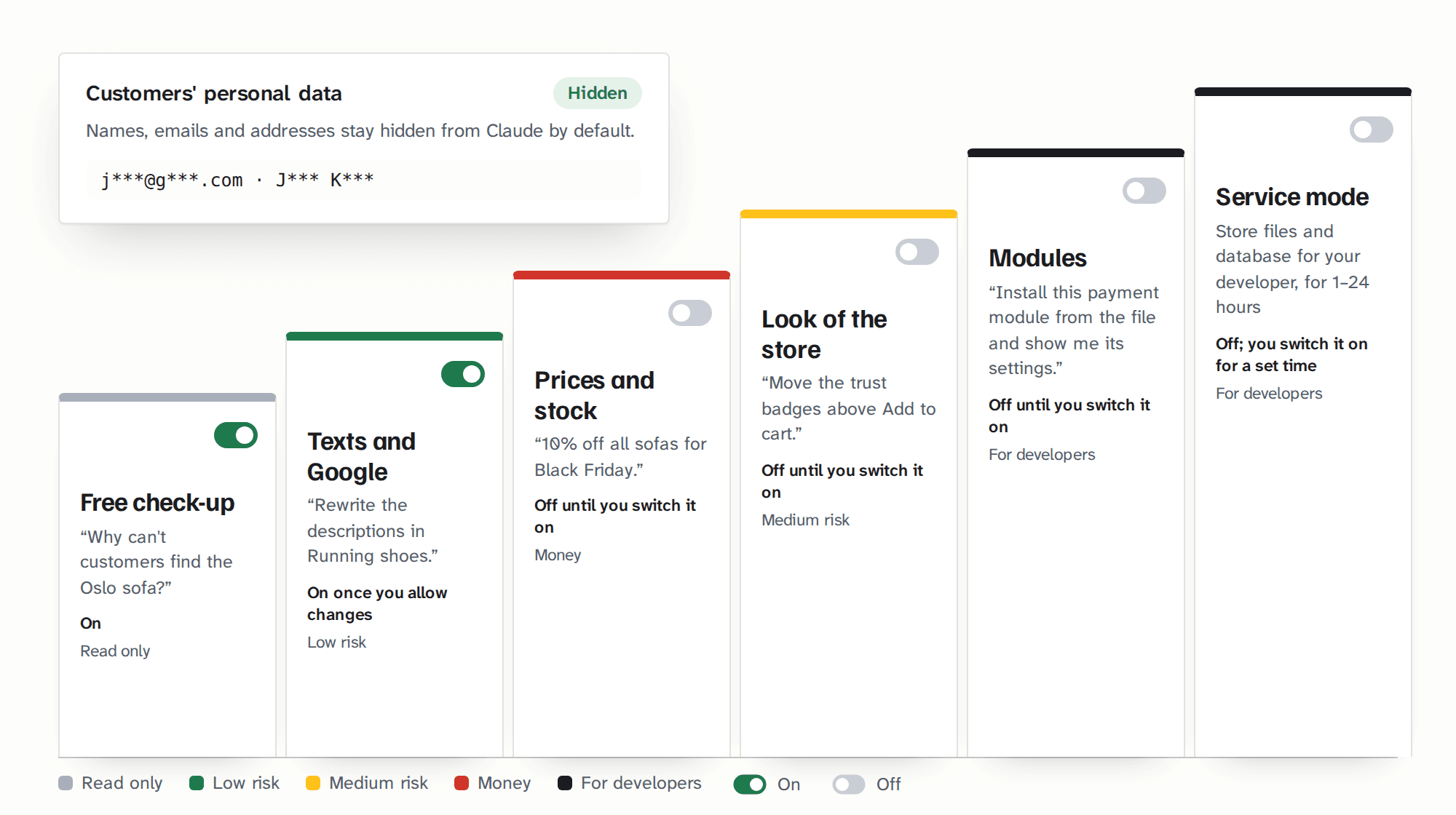
| Step | Example job | After install |
|---|---|---|
| Store check-up | "Why can't customers find the Oslo sofa?" | On, free |
| Texts and Google | "Rewrite the descriptions in Running shoes." | On once you allow changes |
| Prices and stock | "10% off all sofas for Black Friday." | Off until you switch it on |
| Look of the store | "Move the trust badges above the Add to cart button." | Off until you switch it on |
| Modules | "Install this payment module from the file and show me its settings." | Off until you switch it on |
| Service mode | store files and database for your developer, for 1–24 hours | Off; you switch it on for a set time |
Store check-up
After install: On, free"Why can't customers find the Oslo sofa?"
Texts and Google
After install: On once you allow changes"Rewrite the descriptions in Running shoes."
Prices and stock
After install: Off until you switch it on"10% off all sofas for Black Friday."
Look of the store
After install: Off until you switch it on"Move the trust badges above the Add to cart button."
Modules
After install: Off until you switch it on"Install this payment module from the file and show me its settings."
Service mode
After install: Off; you switch it on for a set timestore files and database for your developer, for 1–24 hours
Claude has no access to your customers' personal data until you switch it on.
You see every change first, and you can always go back
Claude can look at your store freely. When it wants to change something, it first shows you what it will change: the current text or price and the new one. It saves only after you say yes.
Change safety →Free TellMyShop Audit: Claude finds what's wrong
After installation Claude can only look, and it can't change anything. That's already useful. Ask it what's wrong with your store and it will tell you, in plain words:
TellMyShop Audit →Texts and Google, for a whole category at once
The work that eats whole afternoons: rewriting descriptions copied from the manufacturer, fixing how products look in Google, filling in image descriptions, updating the Delivery and Returns pages. Claude does it for one product or a whole category in one go, in your tone and your language.
Texts and Google →Prices, promotions and stock, with a safety net
A clumsy description is a cosmetic problem. A wrong price or a discount code with no limit can cost you money within minutes. That's why prices sit behind their own switch, off until you turn it on.
Prices and stock →The look of your store, with a copy of every file
Small design changes usually mean a message to your developer and a wait. Claude can change texts and layout in your store's theme when you ask, and it saves a copy of every file before touching it. If you don't like the result, one sentence brings the old version back.
Look of the store →
Don't know where to start? Pick a ready-made job.
Every paid license includes 14 ready-made jobs, such as "Product texts and SEO in batches", "New products from a list", "Get ready for Black Friday" or "Why can't customers see this product?". Pick one from Claude's menu and Claude takes it from start to finish: it looks, makes a plan, shows you each change and reports back. In the free TellMyShop Audit, 4 jobs work in full and 7 more give you a ready plan of changes.
The TellMyShop Consultant comes with them: what a good e-commerce adviser knows about Google, AI search, product pages and selling, so Claude can tell you which changes matter most.
For your developer
The jobs are MCP prompts exposed by the module, so they appear in the connector's menu in Claude with nothing to install. The Consultant is built into the module (Claude uses it on its own, a free Claude account works too); it's also available as an optional Claude skill from the customer account.
What else Claude can do in your store
- New products. Paste a list, and Claude adds the products as drafts for you to check. It can also copy an existing product as a template.
- Images and variants. It adds and replaces images, sets their order and creates variants such as sizes and colours.
- Shipping. "Free delivery over €50", set up in one sentence, along with carrier prices.
- Translations. Products, categories, features and pages in your store's second language.
- Customer messages. Claude reads messages and drafts replies. You send them. This works only when you switch on access to customer data.
- Store pages. A new page, such as "How to pick your size", and a redirect from a discontinued product to the one that replaces it.
For agencies and developers
The last two steps are for whoever looks after the technical side of the store. Both come with every paid license, and both start switched off.
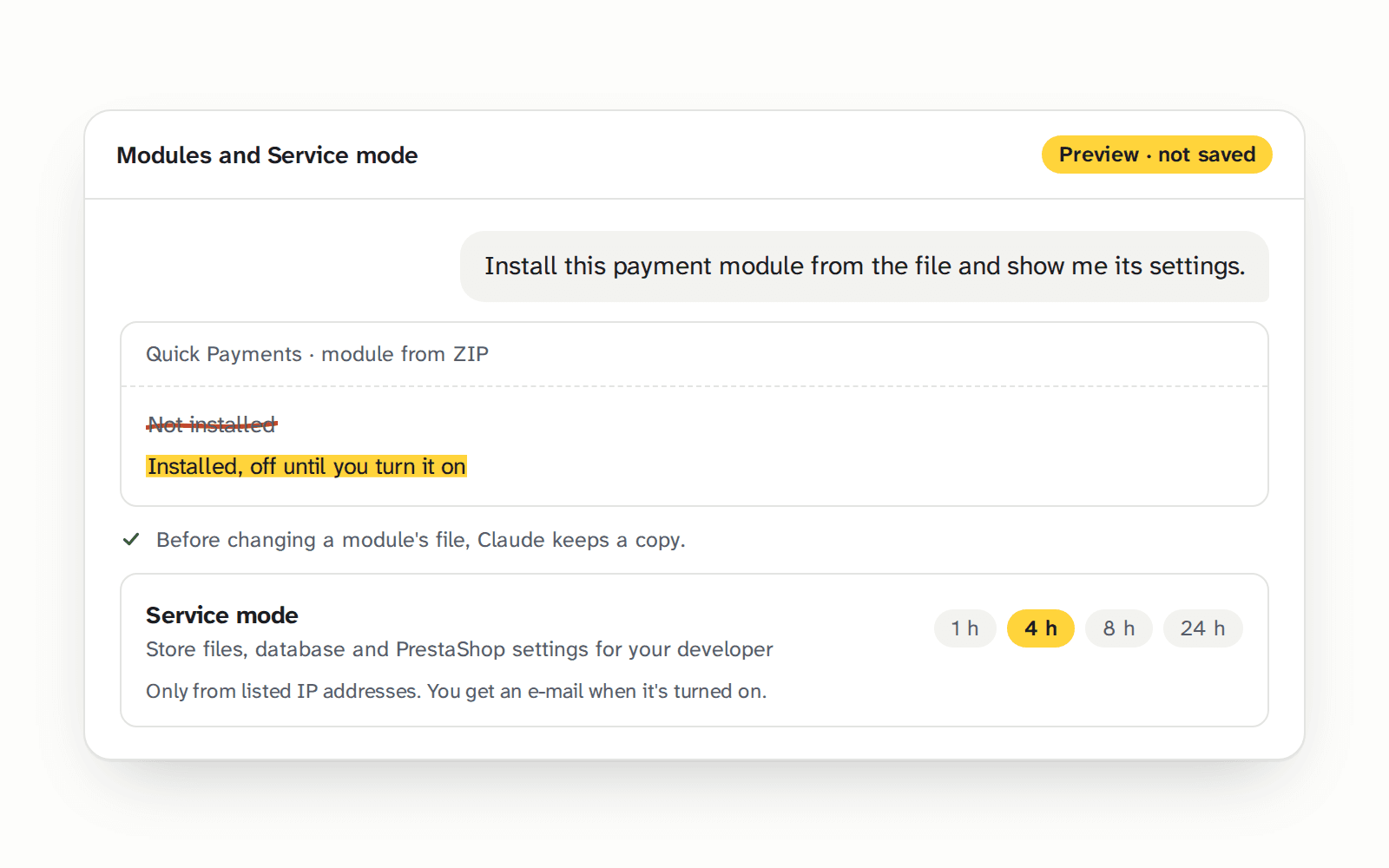
- Modules. Claude switches modules on and off, installs and updates them from a ZIP file and changes their settings. It backs up a module's file before changing it.
- Service mode. Store files, the database and PrestaShop settings, for 1, 4, 8 or 24 hours only, through a separate connector and only from listed IP addresses. Every database change keeps a copy of the rows it changed.
The owner gets an email every time someone switches on wider access.
For your developer
Service mode doesn't run arbitrary PHP; writing PHP files passes a syntax check and creates a backup.
Tools: ps_toggle_module, ps_install_module, ps_uninstall_module, ps_module_config, ps_module_file, ps_server_file, ps_db_query, ps_db_execute, ps_config
Your customers' data stays private

Claude works on your catalog, texts and settings. It can't see your customers' names, emails or addresses until you switch access on in the “Customer data (GDPR)” tab.
Designed to help you meet GDPR, UK GDPR, CCPA/CPRA and LGPD requirements.
Built to PrestaShop's technical standards for modules
- Safe database queries
- Escaping
- File protection
- Clean uninstall
The module finds personal data on its own.
It recognises every table with emails, names, phone numbers, addresses and IP addresses, including tables from other vendors' modules. You don't have to point at anything.
Three levels instead of one switch.
Off (default): Claude sees no customers, addresses, orders or messages. Masked: Claude sees orders and messages, but each customer only as a fixed pseudonym like “Customer-7f3a9c”, so it knows someone bought three times but not who. Emails, phones and addresses are masked. Full access for 1, 4, 8 or 24 hours, for example to handle a complaint, then it switches itself back. You type the reason when you turn it on and get an email.
Files Claude won't open.
Server logs, customer uploads, database dumps and files with passwords are always blocked. In the error log, emails and IP addresses are hidden.
Encrypted change history.
Personal data in the change history and file backups is encrypted with a key kept outside the database. A leak of the database alone won't expose it. The module deletes history older than 180 days on its own.
You decide about service mode.
When you give your developer wider access, you state the purpose, and that goes into the log too.
An audit log you can't wipe.
In the Customer data tab you download a CSV showing who switched on full data access, service mode, blocks or the licence, and when. It can't be cleared from the panel, which helps when you document GDPR compliance.
For your developer: table detection by column names (email, firstname, lastname, phone, address1, ip_address…) in INFORMATION_SCHEMA; one filter on every tool's output; var/logs, upload/, download/, *.sql, *.gz, .git, parameters.php blocked; libsodium encryption with the key in a file outside the database.
What you need
- A store on PrestaShop 8.1 or newer, including 9, on a server with PHP 8.1 or newer
- Any Claude account, including the free one
- Nothing else: no PrestaShop Account, no API keys, no extra subscriptions
For your developer
PrestaShop 8.1+ or 9, PHP 8.1+, HTTPS with a public address (Claude connects from Anthropic's servers, so staging copies need this too). Any Claude account will do, including a free one.
The English version launches in January 2027
Join the list and you'll hear first when it opens, with a 72-hour head start on the launch offer.